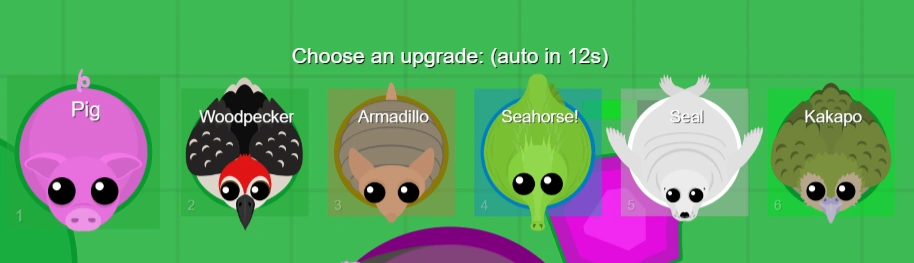
The upgrade menu as of November 15, 2024. Showing upgrade options for tier 4.
The upgrade menu, also called the choice menu, is the screen that allows the player to choose their animal for the next tier. It is one of the basic functional parts of Mope.io and will appear once a player has reached the maximum XP requirement for whichever tier they are on, allowing them to proceed to the next one.
The upgrade menu was initially introduced December 12, 2016; prior to then, players could not choose to play as animals from different biomes to the one they were in. In October 2021, multiple updates were made to change the user interface (UI) of the upgrade menu, which were met with backlash and criticism.
On November 15, 2024, the classic version of the upgrade menu was restored with some tweaks; it is the current version in-game.
Current version
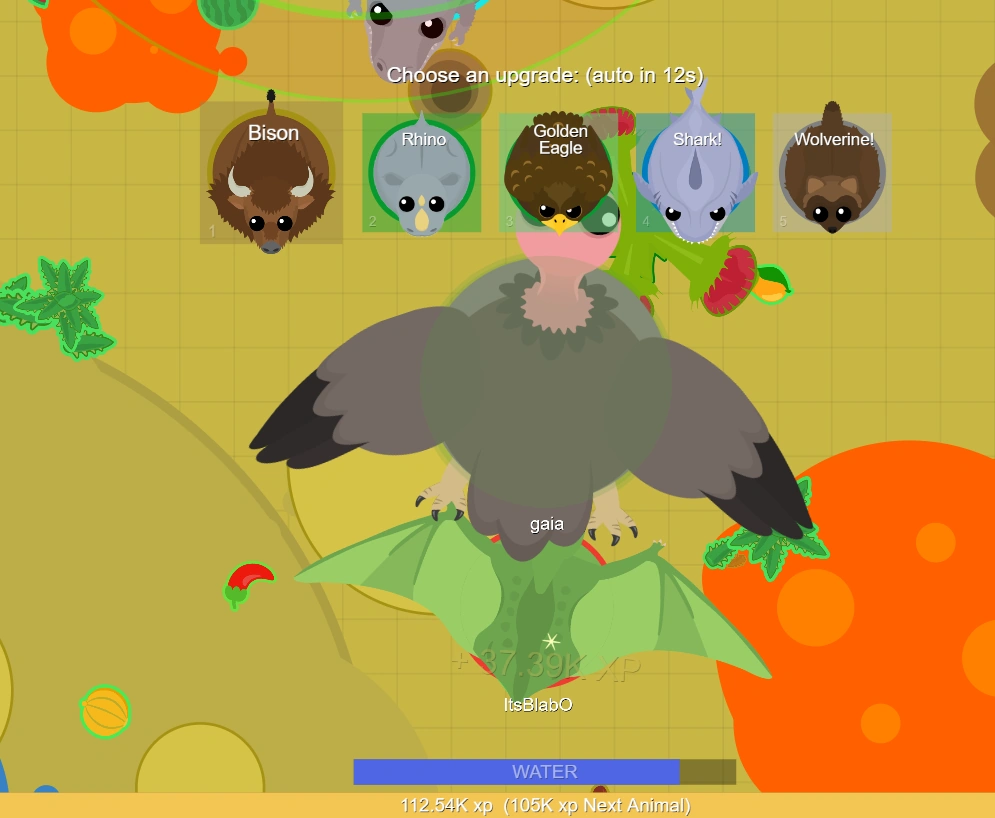
The current upgrade menu, also known as the November 15 upgrade menu, is mostly similar to the 2016 menu; it was added on November 15, 2024. It comprises of a row of small boxes dropping down from the top of the screen once the required XP to the next tier was hit; each containing the picture of the animal, with the animal's name written at the top of the boxes. The player can either click a box or use a hotkey (on desktop) to select the animal. Number hotkeys (1–10) are used.
If rare animals appear on this upgrade menu, their names will have yellow-gold text rather than white text. The 2016 menu did not have this feature.
Players that use low-graphics mode will have a slightly different upgrade menu; it only shows the animal image in the box, and not the animal's name.
Usually, the upgrade screen choices are that of the following tier. If the player gets enough XP at once to skip past the next immediate tier's XP requirement, it will show the highest tier's choices where they meet the minimum but not the maximum, rather than the next immediate tier's choices. This is presumably to avoid needing to upgrade rapidly through multiple tiers. Tier skips often occur if the player gets a kill on a high XP animal as a relatively low tier, as shown with the image on the right. This feature is present on all upgrade menu iterations.
After upgrading, the player is granted 5 seconds of invincibility, indicated by flashing their neutral outline color per second.


Skin customization
- Main article: Skins § Wardrobe
Unlike the 2016 menu, custom skins from the Shop need to be customized via the Wardrobe tab in the Shop in order for them to replace the default Season 1 animal skin on the upgrade menu. This process must be done individually for each animal that the player has bought skins for. If the player does not change an animal's skins using the Wardrobe, the Season 1 skin for that animal will appear by default.
Auto-upgrade

A Super Mouse auto-upgrading into a Carrot Rabbit
Auto-upgrade is the phenomenon by which players who do not click an option on the upgrade menu will be forcibly upgraded into the first option presented on the menu after the 15 second upgrade timer runs out. Auto-upgrade was a feature from the inception of the upgrade menu on December 12, 2016, and was removed with the addition of the upgrade egg on February 1, 2022. With the return of the classic-style upgrade menu on November 15, 2024, auto-upgrade currently exists in Mope.io.
If the player does not choose an upgrade option within 15 seconds, they will automatically upgrade to any rare animal in the upgrade box. If no rares are on the upgrade menu, they will upgrade to the next animal in the first box, which will be whatever biome their current animal resides in. For example, suppose someone is playing as a Fennec Fox (a Desert animal) and has the upgrade menu open. If they do not select anything and have no rare options, the Warthog will be chosen as it is the next upgrade in the biome's tier line.
The amount of time before auto-upgrading will go into effect is displayed next to the "Choose an upgrade:" text. It turns red and flashes each second once it reached 7 seconds. If the player is respawning/spawning with the upgrade menu, the amount of time is not displayed although the text will still turn red and the player will auto-upgrade if they don't select a spawning animal. The upgrade menu from October 14 did not show the auto-upgrade timer ‒ however, it does auto-upgrade the player eventually.
Coin-earning
Auto-upgrading or waiting about 11 seconds (i.e. the last 4 seconds of the upgrade timer) on the upgrade menu will allocate an additional 6 mopecoins to the player's Shop account. This effectively allows the player to earn up to 102 coins per game when upgrading uninterrupted without dying from tiers 1 to 17, as long as the player waits at least 11 seconds each time the upgrade menu appears.
This feature was previously implemented on November 19, 2020, allocating 10 coins rather than just 6. Following the Season 2 upgrade egg update (2022), coin-earning in this way became obsolete due to the upgrade egg preventing auto-upgrade. It initially did not return for the November 15 update due to coins being disabled, but was reinstated on March 29, 2025.
Selecting certain rare animals on the upgrade menu formerly gave a coin reward as well, but this feature was removed on November 15.
Old versions
August 3, 2023 – November 15, 2024
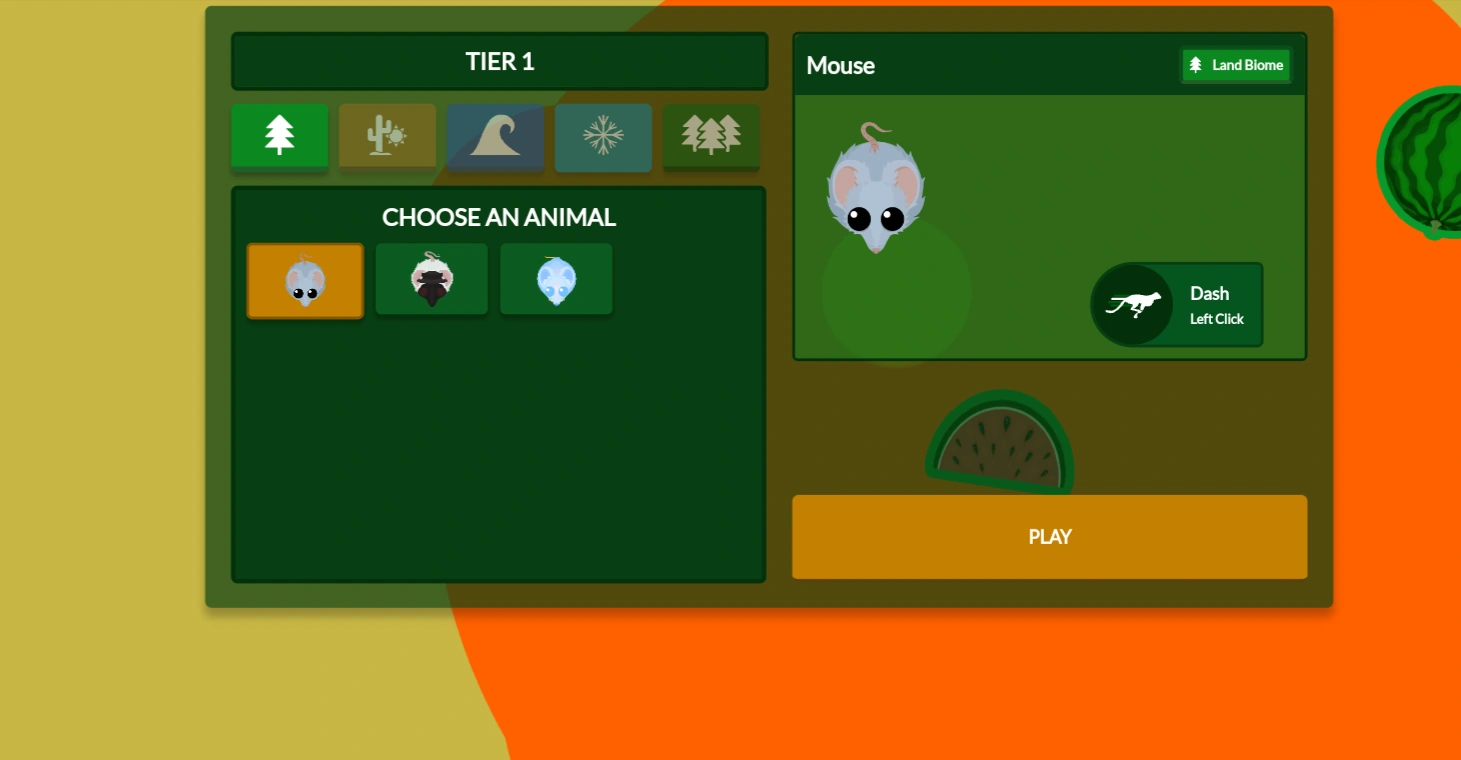
The upgrade menu as it appears on mobile, with the tier 1 animal options
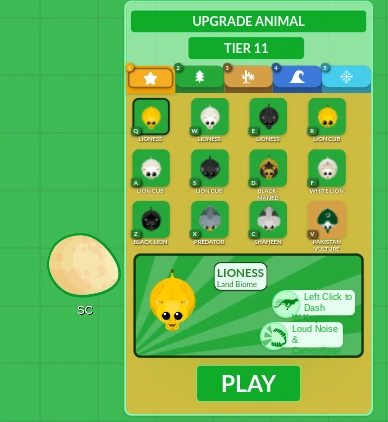
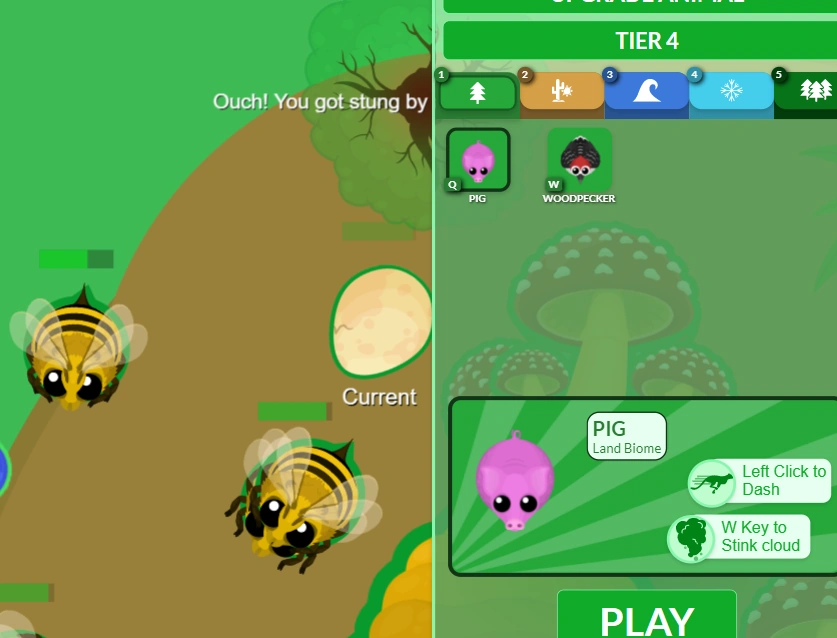
The August 3 upgrade menu was in-game from August 3, 2023 until November 15, 2024. It looks a lot like the Shop in terms of style; it has a rounded dark green background with tabs for each biome[note 1] to categorize the selectable animals. The tabs that can appear are: Land, Desert, Ocean, Arctic, Volcano and Forest, which are represented with picture logos. Each biome's logo is a tree, cactus and sun, wave, snowflake, volcano, and three trees, respectively. While Land and the Forest both have trees as their icon, the Land tab is light green while Forest is a darker green with three trees. If a Rare Animal appears on the upgrade menu, an additional yellow tab with a star icon will be present.
In each tab, there are the Animals belonging to the respective biome and any owned skins corresponding to those animals. An Animal's respective skin is listed after the default animal unless it is a gold trim or classic skin, in which it replaces them. The player may select an Animal and click the play button to upgrade to that Animal. When an Animal is clicked, a larger box on the right of it shows its Special Ability (if it has one) and the run (called dash in the box) function. It will automatically default to the tab of the biome the animal came from/is in, unless a Rare is present, in which it defaults to the first Rare animal in the tab.
The player can use number hotkeys to jump to a particular biome tab (1–6) and letter hotkeys (starting from Q, avoiding W and S) to jump to a particular skin or animal. The respective key is shown in the lower corner of said tab or animal/skin. This does not display on handheld devices, as seen in this section's image.
Unlike its most recent predecessor, the August 3 upgrade menu is more rectangular-shaped and centered. Also unlike its predecessors, the player's team is not displayed in Team Mode — the player must spawn to know their team.
October 21, 2021 – August 3, 2023
The October 21 upgrade menu was the most upright of them all, with a lighter green color scheme, and floated to the left of the screen. Like its modern equivalent, it has tabs for each biome, although until November 24, 2021, the Forest's tab icon was identical to the Land's. It was adjusted several times, the most notable changes being the removal of a timer at the top right sometime in later 2021 or 2022 and an indicator of the player's team in Team Mode.
The handheld version of Mope.io used this upgrade menu from October 20, 2021 to March 7, 2023.
The auto-upgrade timer was significantly shorter at its release and all older versions of the upgrade menu, only lasting 15 seconds. It was extended to an unknown amount due to player criticism in later months.


October 14, 2021 – October 21, 2021
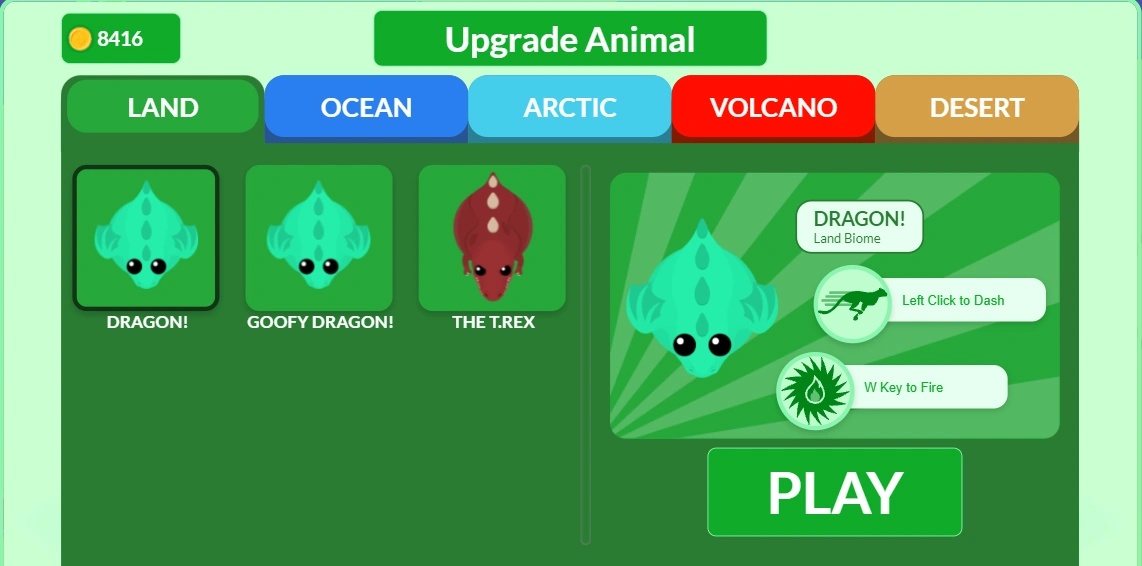
An example of the upgrade menu from the first October 2021 UI update, leveling up from tier 14 to 15 (apex tier).
The October 14 upgrade menu, also known as Version 3 UI, has a unique style which continued to exist in later revisions. It is a light green rounded box with tabs for each biome where the tier has animals in. The tabs that can appear are: Land, Ocean, Arctic, Volcano, Desert and Forest. It will automatically default to showing the Land tab first, no matter what biome the player's Animal belongs to.
In each tab, there are the Animals belonging to the respective biome, where the player may select an Animal and click the play button to upgrade to that Animal. When an Animal is clicked, a larger box on the right of it shows its Special Ability and run (called dash in the box) function. However, notable differences are that it lacked hotkeys to upgrade, a timer showing the amount of time before auto-upgrading occurs, and was a lot larger than the current upgrade menu.
In response to harsh criticism from the community of the October 14 upgrade menu, it was replaced on October 21.
December 12, 2016 – October 13, 2021
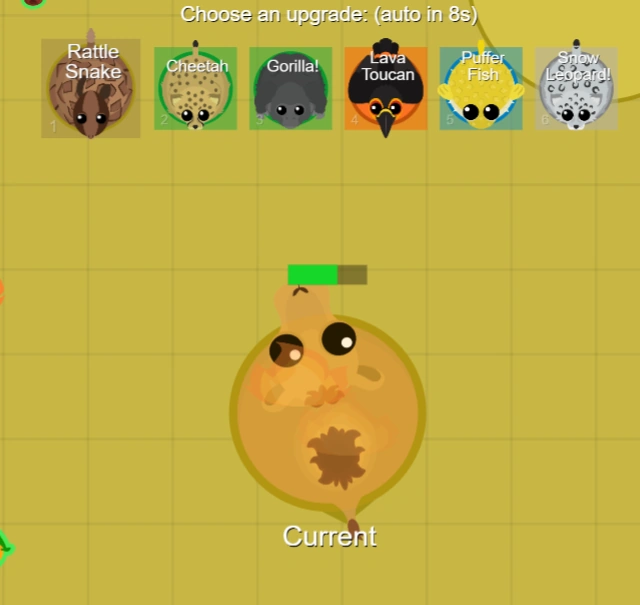
An example of the upgrade menu before the UI updates in October 2021, leveling up from Tier 8 to 9 with Lava Toucan and Yellow Puffer as two of the options.
The classic upgrade menu, also known as the 2016 upgrade menu, is the oldest and first iteration of the upgrade menu. It was in-game from December 12, 2016 until October 13, 2021. It is essentially the same as the current version that was introduced on November 15, 2024. The differences between the 2016 and November 15 upgrade menu are as follows:
- Custom skins are shown beneath the default skins, categorized in rows depending on what update were they released. Having many Skins potentially lagged the game with the amount of boxes, and can temporarily obstruct gameplay.
- Any skins on the 2016 menu used letter hotkeys (a–z; avoiding
W). - The names of rare animals in the upgrade menu had white text, like the other animals.
The original and oldest upgrade menu had a row of larger boxes before it was changed in 2021.
Old mobile version
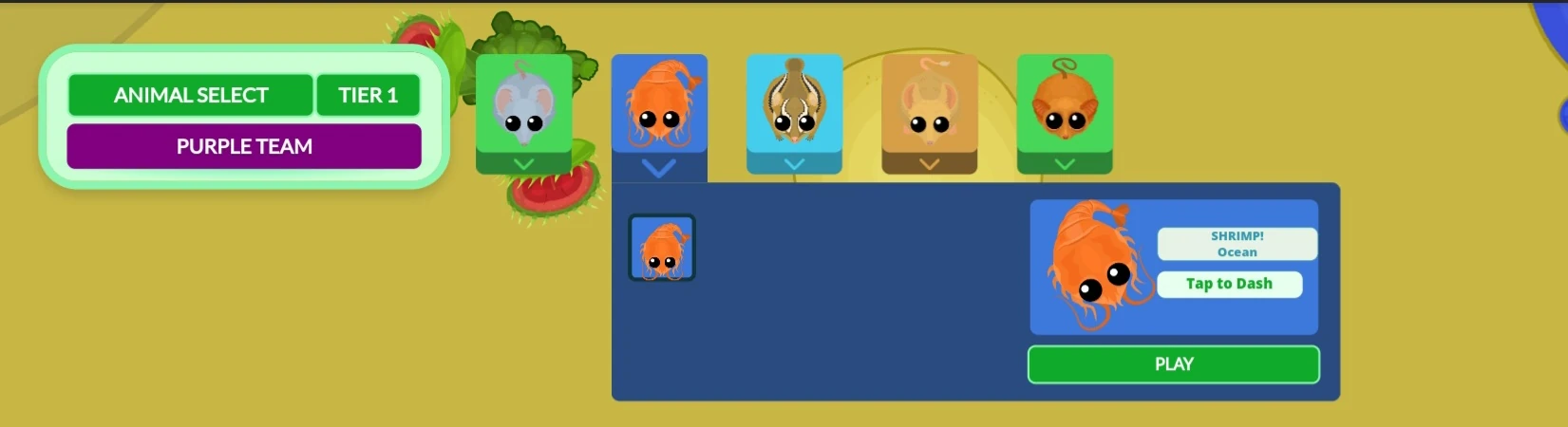
An example of the upgrade menu on mobile. In this image, the Shrimp's box is picked, revealing its Special Abilities.
This upgrade menu only appeared on the handheld version of Mope.io from March 7, 2023 to August 3 2023. It was much more compact, composed of a box showing tier and team (regardless or not the player was in Team Mode) and small boxes colored accordingly to biome. Each box had an image of an animal of the next tier with a downwards arrow beneath it. These boxes were plastered in a row across the top of the screen. When an animal is clicked, its biome and special abilities are shown. option too quickly. The upgrade egg will break and release the player if they choose an option on the upgrade menu prior to the allotted time.
Deprecated features
Upgrade egg
The upgrade egg in-game
- Main article: Upgrade egg
The upgrade egg, also referred to as the upgrade shell, was added on February 1, 2022 to replace the auto-upgrade function. It was an object that formed around players when the upgrade menu appears for them, protecting them from the outside world and preventing them from moving until upgrading.
The upgrade egg was removed on November 15, 2024. Auto-upgrade was added back to replace it.
Powerups
- Main article: Powerups
Powerups were purchasable buffs that appear for logged in players under the tier 1 upgrade menu when a game session is first initiated. They did not appear again once the player had entered the game. Powerups were also removed on November 15.
Gallery


History
- This section lists the update history of the Upgrade menu as it is recorded in the changelog, as well as leaks or reveals from social media. Certain changes that were not explicitly added to the changelog might be missing.
| Update History | |||||
|---|---|---|---|---|---|
| Update | Changes and notes | ||||
| |||||
| |||||
| |||||
| |||||
| |||||
| |||||
| |||||
| |||||
| |||||
| |||||
| |||||
| |||||
| |||||
| |||||
| |||||
| |||||
| |||||
| |||||
| |||||
| |||||
| |||||
| |||||
| |||||
| |||||




Criticism

The December 2016 upgrade menu in-game. Commonly praised for its simplicity compared to the later 2021 versions.
Very few visual changes have been made to the upgrade menu since the feature's release. The first major change was when the Storefront update on May 22, 2021, which minimized the size of the upgrade menu to fit more Skins on the screen. This caused some complaints about animal names occasionally not showing up on one's screen, complaints that continued all the way until the first 2021 UI update.
The biggest, and arguably most controversial change was added with the "Version 3 UI" update on October 14, 2021. It completely changed the upgrade menu to use biome-organized tabs. Many players on the Mope.io Subreddit have argued about the excessive amount of time it takes to upgrade (previously, it only took a couple seconds), and that is very easy to miss Rares if all tabs are not checked. One focal point is how the upgrade menu blocks a large part of the screen;[1] combined with the fact the player needs to click on a tab to select their animal, leaves the player in a very vulnerable position to predators and hazardous terrain such as lava.

The October 21 upgrade menu in-game. Seen as an improvement from the October 14 version, it was criticized nonetheless as inferior to the 2016 menu.
In response to backlash surrounding the October 14 changes, the upgrade menu was altered again in the "Hotfix 3.1" update on October 21, 2021.[2] Now, it takes up less space on one's screen, has a timer to represent how close auto-upgrade is of occurring, has the protectional upgrade egg feature to give players time to select their animal, and reinstated the feature of hotkeys. The October 21 upgrade screen has been seen as an improvement over its recent predecessor ‒ however, the majority of the community still prefers the earliest version due to its simplicity and being able to see all possible animal options at the same time.[1][3][4]
A poll was conducted on Mopecord from September 11–18, 2024, asking whether the upgrade egg should be removed. The poll's results showed 421 people (82%) in favor of removal, while 93 people (18%) were against.[5] Consequently, the current version of the upgrade menu was restored on November 15, 2024. This current version is mostly similar to the 2016 upgrade menu, with the difference being Shop skins must be selected via the wardrobe in the Shop for them to appear on the upgrade menu; and rare animal names appear in gold.
The return to the old pre-2021 upgrade menu UI has been received well by the community, though some players have requested the wardrobe feature be removed in favor of showing all possible skins on the upgrade menu like previous revisions.
Trivia
- Before the upgrade menu was added, players that reached the necessary XP to enter the next tier would automatically have the next animal of whichever biome they were in selected for them.
- Because the upgrade choices are calculated when the player meets the maximum XP of their tier, this can sometimes cause scenarios (especially with watermelon farming or upon eating meat) where the player gets enough XP to upgrade to a tier (causing the upgrade menu to show), is very close to the maximum XP of that tier, and gets enough XP to upgrade again before picking an option, causing the player to need to upgrade twice in quick succession.
Glitches


Mommaffe instead of Camel in the Desert spot
- In the Beta testing of one of the new UIs, clicking another tab when upgrading to tier 12 would cause all the UI (including the upgrade menu) to disappear. This was not seen on the live release.
- Some animals or skins didn't load on the modern upgrade menus, leaving an image placeholder and/or becoming an orange/black blob in-game without other assets. The latter has known to have occurred with the Markhor (and its skins), Bigfoot, and Smile Spider skin.
- Similarly, some skins loaded the incorrect skin or a completely different animal with the October 14 upgrade menu. These bugs were later patched with the October 21 update, but still sometimes occurred when switching between biomes. With the November 15 upgrade menu, this is no longer the case.
- A bug caused the upgrade menu to not appear at all when upgrading to tier 14, always auto-upgrading the player. It temporarily broke the XP bar and caused the leaderboard to disappear for the duration it was supposed to be on screen. It was fixed several weeks later.
- The player's team was indicated regardless or not they were playing Team Mode.
Footnotes
- ↑ 1.0 1.1 "My Feedback on the New UI. : r/mopeio" (October 15, 2021). Reddit. Retrieved on July 7, 2022.
- ↑ "Hotfix 3.2 Feedback : r/mopeio" (October 23, 2021). Reddit. Retrieved on July 7, 2022.
- ↑ "UI : r/mopeio" (October 18, 2021). Reddit. Retrieved on July 7, 2022.
- ↑ "Changes KOA should make to revive the game- : r/mopeio" (June 4, 2022). Reddit. Retrieved on July 7, 2022.
- ↑
 Mistik [@nbkmistik] (September 11, 2024). "Should we remove eggs?" (Message from Mopecord). Retrieved on September 18, 2024 – via Discord.