
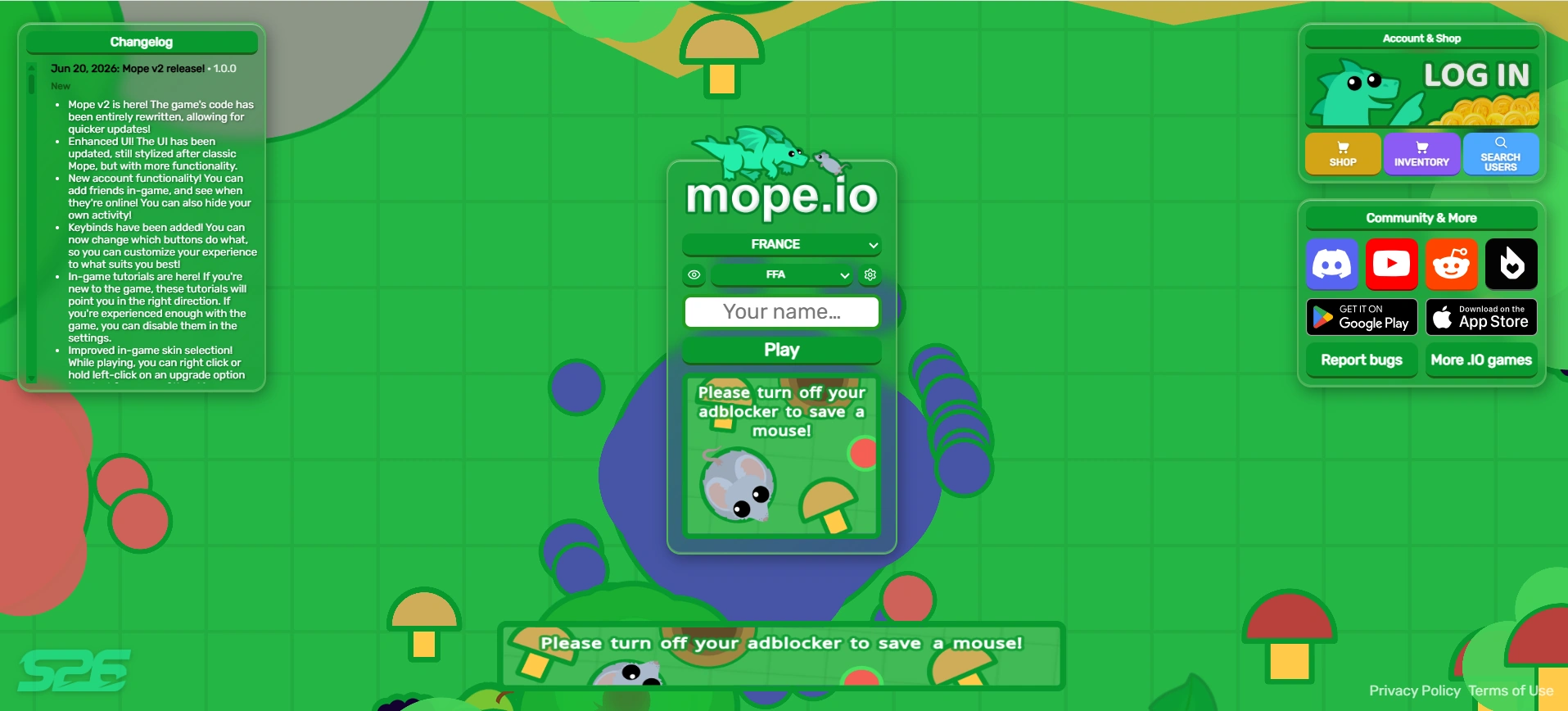
The home screen as of June 20, 2026.
The home screen is the screen in Mope.io that appears prior to spawning or respawning, and when players first enter the website. Through the home screen, players can access the Shop, settings, change servers, and more. Additionally, relevant social media platforms are also linked on the home screen.
Overview[]
- The home screen is used to enter the game. When clicking on the green
Playbutton, players will be brought into the game, being given the animal options for their tier based on how much XP they have. If a player has only just entered the game, they will have a default of 0 XP, and start at tier 1. A brief tune is played in the first 5 seconds of spawning or respawning if sound is enabled in the settings.- Above the
Playbutton, there is a blank box which is where the player enters their name. The cog on the right-hand side of the name box is the settings cog, which when clicked, will give access to settings for graphics, sound, other options and whether they are playing or spectating the game.
- Above the
- To the right of the screen, a box encourages the player to login to use skins and has the Shop and login buttons. If logged in, the text disappears and the player's account name, profile picture associated with the account, and current coins are shown. The login button becomes a logout button.
- A smaller box under it leads to the Google Play and Apple Store storefronts for the app.
- The bottom left has announcements and the total player count. The current advertisement announces the V2 migration.
- The left side of the screen reads the most recent updates from the Changelog in a scroll. Under the scroll box is a heading reading "Mope.io Community" that links to Mope.io Discord, Reddit, support, the full Changelog site, the privacy statement, a link to this wiki, and more io games. Mistik's YouTube channel is linked underneath with the subscriber amount.
End screen[]
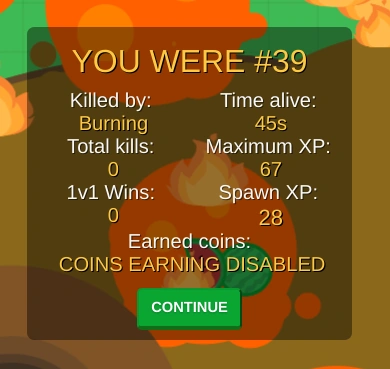

An example of an end screen
The end screen, commonly called the death screen, was a feature in Mope.io that showed the player's stats after dying in-game. It was added on November 22, 2024 and removed on June 20, 2026.
- The end screen displays as a box a couple seconds after the player dies. It has eight statistics, split in two columns:
- The player's Leaderboard position at death, subtitled "YOU WERE #number" in centered yellow all caps text at the top of the box.
- The player's cause of death subtitled "Killed by:". Thirst, burning, tail bites, and direct predation are recognized. If death is caused by a player, the player's name is noted. Other deaths, such as poison from the poison lake, are not recognized and are labeled Unknown.
- Amount of kills on other players, subtitled "Total kills:"
- Amount of 1v1 wins the player had, subtitled "1v1 Wins:"
- The time the player was alive from their spawn or respawn, subtitled "Time alive:"
- The most amount of XP the player had in their time alive, captioned "Maximum XP:"
- The amount of XP the player will respawn with, captioned "Spawn XP:"
- The amount of coins of players got from the session, subtitled "Earned coins:"
- Logged out players instead get the message "(Log in to earn coins)".
- A continue button is found at the bottom of the box. Clicking it will lead to the home screen.
Trivia[]
- In the period of Mope.io's initial release, the home screen's only features were the Changelog and a name bar.
- The home screen formerly advertized MooMoo.io underneath the
Playbutton.
Glitches[]
- Currently, the earned coins section of the end screen displays the message "Coin earning begins in 0s" even if the player is logged in.
History[]
- This section lists the update history of the Home screen as it is recorded in the changelog, as well as leaks or reveals from social media. Certain changes that were not explicitly added to the changelog might be missing.
| Update History | |||||
|---|---|---|---|---|---|
| Update | Changes and notes | ||||
| |||||
| |||||
| |||||
| |||||
| |||||
| |||||
| |||||
| |||||
| |||||
| |||||
| |||||
| |||||
| |||||
| |||||
| |||||
Gallery[]
Assets[]

Adblock image, directly under the Play button

Adblock image, further underneath the play menu

Season 2026 (S26) logo

Login button for the Shop
In-game[]

The home screen from June 20, 2026 – present

The home screen from June 13, 2026 – June 20, 2026

The home screen from January 31, 2026 – June 13, 2026

A visual gag for April Fools' Day, from April 1–2, 2026

The home screen from December 25, 2025 – January 31, 2026

The home screen from October 29, 2025 – December 25, 2025

The home screen from January 25, 2025 – October 29, 2025

The home screen from December 25, 2024 – January 25, 2025

The home screen from November 15, 2024 – December 25, 2024

The home screen from 2022 – November 14, 2024

The home screen from June 15, 2021 – 2022

The home screen from May 2021

The home screen from May 2020

The home screen from April 18, 2017

The Changelog button as it appeared from 2022 – November 15, 2024. The red exclamation mark indicated new updates.

MooMoo.io being advertised on the older home screen

Account login details
End screen[]

Death caused by a tailbite

Death caused by a bite from a Goose. Note the coins earned message, due to being logged out.

An older End Screen with death caused by thirst

Death caused by an Ice Monster

An older End Screen with death caused directly from a predator

An older End Screen with death caused by the fire of a Phoenix

An example of an Unknown cause of death (real cause is Arctic Volcano contact damage)
Footnotes[]
- ↑ Stan Tatarnykov [@clickstan] (January 15, 2017). "This [death screen] is definitely coming quite soon, I've had it planned for a while.". Reddit. Archived from the original on May 28, 2026. Retrieved on April 9, 2020.